
Planning a smart home display for a small apartment? Here’s how to compare tabletop and wall-mounted setups, choose a practical side table, and keep power cords under control.
When you live in a small apartment, adding a smart home display isn't just about its features. It's also about where it will go, how much room it needs, and whether you'll still have space for the things you use every day.
Apple's new smart home hub, HomeView, brings this question into focus. Recent reporting describes a display-based device available in both tabletop and wall-mounted versions, with the tabletop model incorporating a speaker base.
For apartment residents, the choice isn't simply about which version looks better. It's about finding a setup that fits the room, keeps controls within reach, and doesn't add unnecessary clutter.
Whether you're planning for HomeView or another smart home display, a little furniture planning can make the setup easier to live with.
1. Start With the Device, Not Just the Screen
A compact display may look small on its own, but the screen isn't the only thing that needs space. The base, power cable, viewing angle, and room needed to tap the display all affect its real footprint.
Before choosing a location, consider:
-
The full footprint: Measure the device and its base, not just the screen.
-
Power access: Check how far the nearest outlet is from the intended spot.
-
Viewing angle: Make sure the screen is easy to see from your usual seat or standing position.
-
Everyday clearance: Leave room for your phone, a drink, a book, or other items you regularly use.
These details matter in studios and compact apartments, where a few inches can make the difference between a useful surface and an overcrowded one.
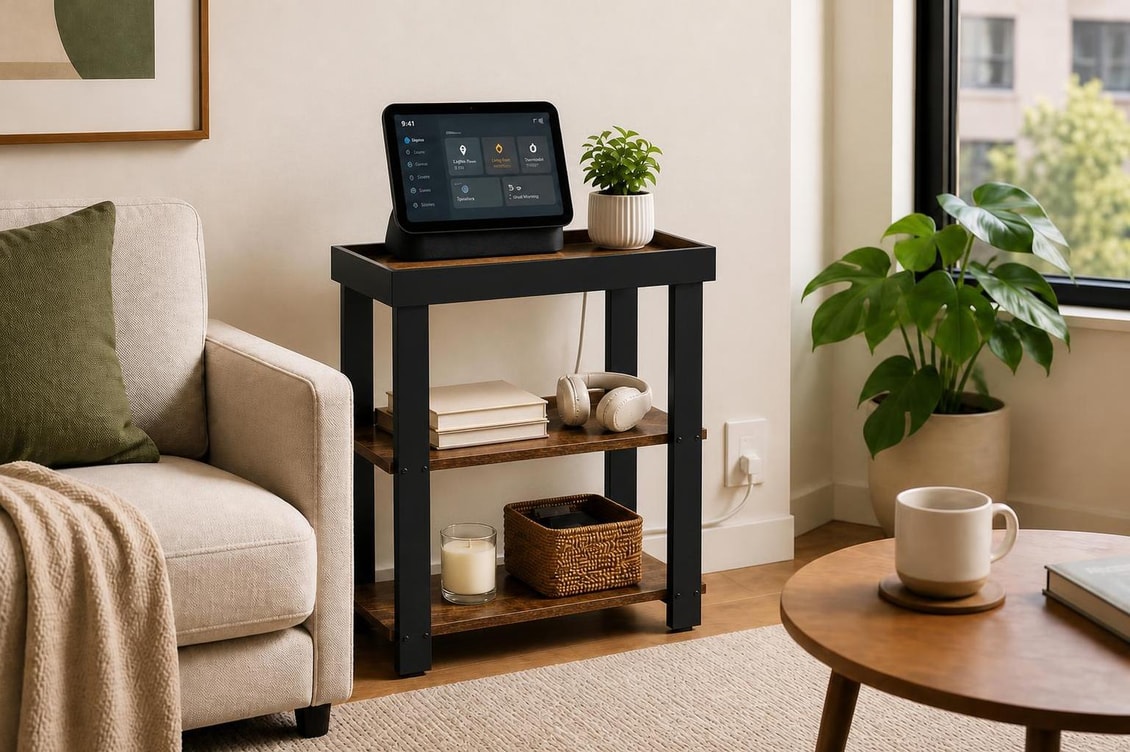
2. Tabletop or Wall-Mounted: Which Works Better in an Apartment?
The right choice depends on your layout, rental restrictions, and how you plan to use the display.
A tabletop setup offers more flexibility
A tabletop smart home display can sit on a side table, bedside table, desk, or open shelf. You can move it when you rearrange your furniture or change how you use a room.
This option may be especially practical if you want to interact with the display while sitting on the sofa, reading in bed, or working at home.
The tradeoff is that the device shares valuable surface space with lamps, books, drinks, and charging accessories.
A wall-mounted setup frees up furniture space
Mounting a display on the wall can keep a small tabletop clear and create a consistent place to access home controls.
However, you'll need a suitable wall, a comfortable viewing height, a practical power route, and an installation method that works for your home. Renters should also check their lease and obtain permission when necessary.
A wall-mounted device isn't automatically the better choice. If installation is difficult or you frequently rearrange your space, a movable setup may be more useful in the long run.
Match the setup to the room
-
Bedroom: A tabletop display can stay within reach, provided it doesn't crowd your bedside essentials.
-
Living room: A side table can place the screen near the sofa, while a wall mount may work better when several people need to see it.
-
Home office: A movable setup can share a secondary table or shelf without requiring a permanent installation.
-
Reading nook: Either option can work as long as the display remains accessible without competing with your reading light.
The goal is to make the device fit naturally into your routine rather than rearranging the entire room around it.
3. Find the Best Home Hub Location in a Small Space
Before buying new furniture, identify where the display would be most useful.
Think about where you naturally pause, sit down, or pass through the room. A shared home display should be easy to reach and see without blocking a walkway or requiring you to lean around another piece of furniture.
A simple way to test a location is to use a cardboard cutout roughly the size of the device and its base.
Place it where you think the hub might go, then check the following:
-
Can you see the screen comfortably while sitting and standing?
-
Does the device interfere with a lamp, window, or frequently used item?
-
Is the power outlet close enough for a tidy cable route?
-
Can you walk past the furniture without squeezing through?
-
Will screen glare make it difficult to see during the day?
For renters and people living in studios, flexible furniture can be particularly helpful. A narrow side table or open shelf can be moved when your layout changes, without committing to a permanent installation.
4. What to Look for in a Side Table for Small Spaces
A good side table should support your smart home setup without taking over the room.
When choosing a side table for small spaces, look beyond its overall width. Consider the usable tabletop area, height, stability, storage, and cable access.
Stability comes first
If you need to tap the screen regularly, choose a table that feels steady and has a level surface. A narrow table can be useful in a tight gap, but it shouldn't wobble during everyday use.
Choose a comfortable height
The display should be easy to see and reach from the nearby sofa, chair, or bed. A table that's too low may make the screen awkward to use, while one that's too tall may feel out of place beside your furniture.
Make use of vertical space
A tiered side table can provide extra room for books, chargers, or small accessories without requiring a much larger tabletop.
Keeping everyday items on a lower shelf also helps the main surface stay clear for the display and other essentials.
Leave room around the device
Avoid choosing a table that fits the display but leaves no space for anything else. Even a small amount of extra surface area can make the setup more practical for daily use.
For example, a compact table beside the sofa might hold a smart display at the back, with enough room in front for a phone or cup. The exact arrangement will depend on the device's dimensions and base.
5. Plan Power and Cable Management Before Placement
A tidy smart home setup starts with the power outlet.
Before moving furniture or purchasing a new table, measure the distance between the outlet and the proposed device location. Account for the route down the table and along the wall, rather than measuring only the straight-line distance.
These side table cable management ideas can help keep cords organized:
-
Adhesive cord clips: Guide a cable along the back leg or underside of a table.
-
Cable sleeves: Group several cords together near a shared charging area.
-
Cable raceways: Keep cables neatly routed along a wall where appropriate.
-
Under-table organizers: Keep excess cable off the tabletop and away from the floor.
Choose removable options when you rent or want to avoid damaging walls and furniture. Keep plugs and adapters accessible so you can disconnect the device without pulling the table away from the wall.
Never route a cable across a walkway where someone could trip over it, and avoid placing electrical connections where spilled drinks could reach them.
Furniture design can help, too. Open backs, accessible rear edges, and lower shelves can make it easier to organize cables without sacrificing useful surface space.
6. Think Beyond the Smart Display
A smart home hub is only one part of a small-space setup. The furniture around it should still work for everything else you do in the room.
A side table beside the sofa, for instance, might need to hold a lamp in the evening, a coffee cup in the morning, and a phone throughout the day. In the bedroom, the same surface may need to accommodate a book, glasses, and a bedside light.
Before choosing a table, ask yourself:
-
What else needs to fit on the tabletop?
-
Would a lower shelf help keep smaller items organized?
-
Can the table serve another purpose if I move the display?
-
Will the furniture still fit if I rearrange the room later?
Thinking about these everyday needs helps prevent a common small-space problem: buying furniture for one device, only to find that it doesn't work well for anything else.
The most useful multifunctional furniture for small spaces supports changing routines rather than serving just one purpose.
7. How ZEXVIDA Approaches Furniture for Smart, Compact Living
At ZEXVIDA, we focus on furniture that helps make small spaces more functional without sacrificing style.
Smart home devices are a useful reminder that even a small apartment needs surfaces for more than one purpose. A well-designed side table can provide a place for everyday essentials, complement the surrounding decor, and help keep frequently used items within reach.
When considering furniture for a smart home setup, useful design features include:
-
Compact profiles that fit beside sofas and beds.
-
Tiered storage that separates everyday items from the main tabletop.
-
Practical layouts that leave room for lamps, books, and drinks.
-
Accessible spaces for organizing power cords and charging accessories.
The aim isn't to buy a separate piece of furniture for every device. It's to choose pieces that adapt to the way you actually live.
Explore ZEXVIDA for more ideas on making small spaces feel both functional and inviting.
Final Thoughts
Choosing furniture for a smart home display is ultimately about balancing convenience, space, and flexibility.
A tabletop setup may be the better fit if you want to move the display between rooms or keep it close at hand. A wall-mounted version may work better if preserving tabletop space is your priority and installation is practical.
Whichever option you choose, measure the complete device, check the power route, and consider how the furniture will support your everyday routine.
In a small apartment, the best setup isn't necessarily the one that takes up the least space. It's the one that makes your home easier to use without making it feel more crowded.
Frequently Asked Questions
How much tabletop space should I reserve for a smart home display?
Measure the full device, including its base, and leave additional room for the power cable and comfortable access to the screen. If possible, reserve space for one or two everyday essentials, such as your phone or a book.
Is a wall-mounted smart home display always better for a small apartment?
No. Wall mounting can free up furniture space, but it requires a suitable location, a practical power route, and an appropriate installation method. A tabletop setup may be more convenient for renters or people who frequently rearrange their rooms.
What makes a side table suitable for a smart home display?
Look for a stable surface, a comfortable height, sufficient tabletop clearance, and a practical way to route cables. A narrow profile and an open lower shelf can provide useful storage without taking up too much floor space.
Should I choose furniture based on the dimensions of one smart home device?
It's better to consider the device's dimensions alongside your other everyday needs. Adaptable furniture can accommodate different displays, speakers, chargers, and accessories as your setup changes.